

# Next.js AI SaaS Architecture in 2026: The Practical Production Blueprint
The short answer: a serious Next.js AI SaaS architecture in 2026 should look like a well-built SaaS product first, with AI capabilities added behind controlled service boundaries. The risky part is rarely the chat box. It is authentication, tenant isolation, billing, usage limits, background jobs, observability, evaluations, data handling, and provider access.
Founders and CTOs often start with the model integration because it feels like the product. That is understandable, but it is backwards for production. AI features multiply ordinary SaaS risks: one user action can trigger expensive API calls, long-running jobs, unpredictable outputs, third-party dependencies, and data movement across systems. If the platform foundation is weak, the AI layer makes every weakness more expensive.
This blueprint focuses on the practical architecture choices that make a Next.js AI SaaS reliable enough to sell, operate, and improve.
Start With The Product Boundary
Before choosing queues, vector databases, or model providers, define what your AI product actually does. Most AI SaaS products fit one of these patterns:
- A workflow assistant that helps users complete tasks inside your app
- A document or knowledge system that retrieves, summarizes, drafts, or transforms content
- An automation product that runs AI jobs in the background
- A vertical tool that embeds AI inside a specific business process
- An internal operations product sold to teams with roles, approvals, and audit needs
Each pattern changes the architecture. A chat assistant may need low-latency streaming. A batch automation product needs durable jobs and retry controls. A document intelligence product needs ingestion, parsing, indexing, permissions, and source attribution.
Do not design around the model API first. Design around the business workflow, then decide where AI belongs.
Recommended High-Level Architecture
A production Next.js AI SaaS usually benefits from a layered structure:
| Layer | Responsibility | Common Choices |
|---|---|---|
| Next.js app | UI, routing, server actions, API routes, proxy | App Router, React Server Components, route handlers |
| Auth and tenancy | Identity, organizations, roles, permissions | Auth provider, custom RBAC, tenant-scoped database access |
| Core backend | Product logic, billing rules, usage policies | TypeScript services, database transactions, domain modules |
| AI orchestration | Prompt assembly, retrieval, provider calls, output validation | Internal service layer, typed schemas, provider abstraction |
| Jobs and queues | Long-running AI work, ingestion, retries, webhooks | Queue workers, scheduled jobs, durable task runners |
| Data layer | Product data, audit data, usage records, embeddings | Postgres, object storage, vector search where needed |
| Observability | Logs, traces, cost tracking, model behavior visibility | Structured logs, traces, metrics, eval dashboards |
The important point is separation. Your UI should not directly know how to call three model providers. Your billing code should not be scattered across route handlers. Your prompt assembly should not live inside React components. Your worker code should not bypass tenant permissions.
Separation is the point. The interface calls your product services, your services call one internal AI gateway, and only that gateway calls providers. Tenancy, billing and audit travel with every call, not after it.
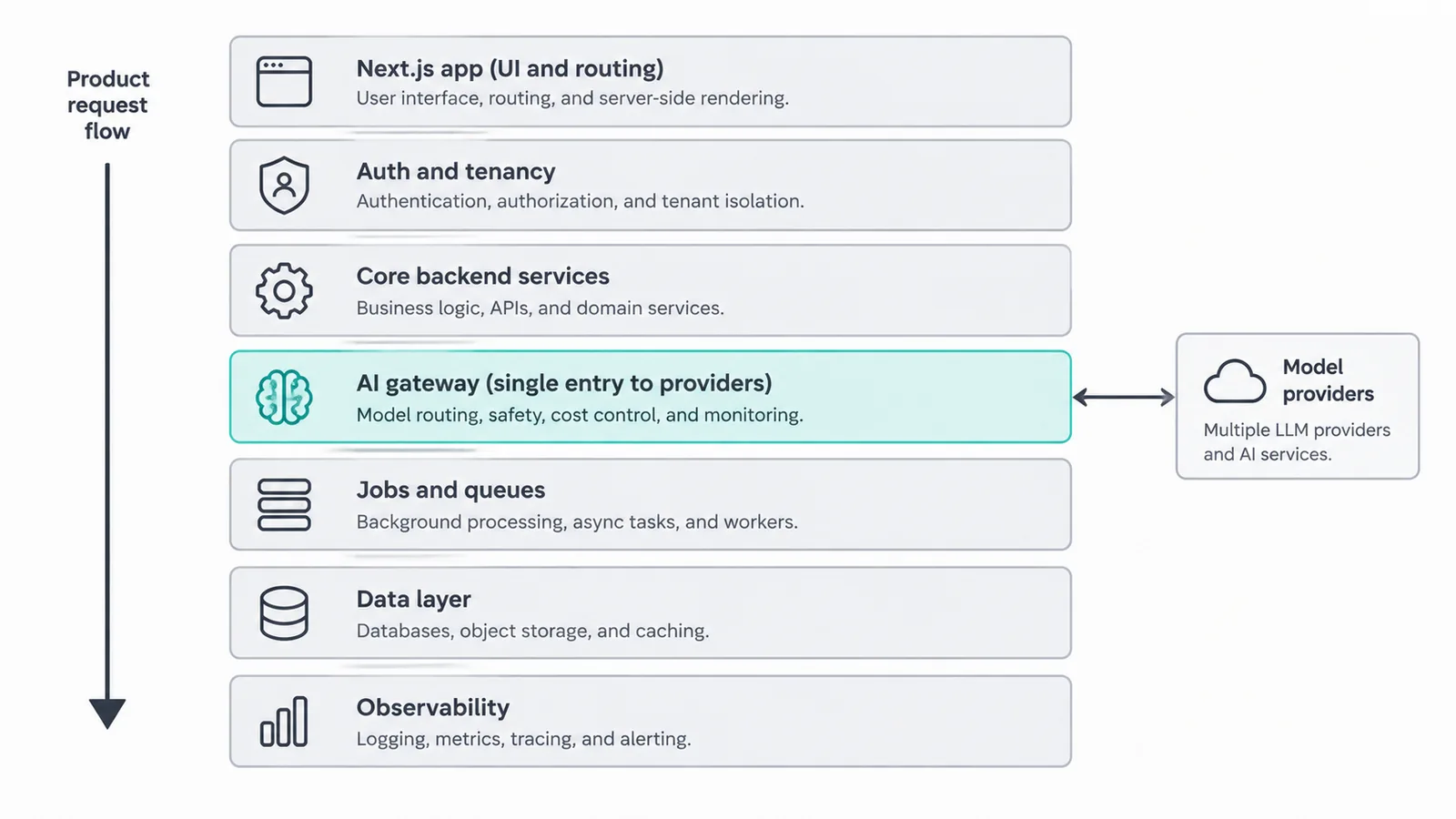
Figure 1: Layered Next.js AI SaaS architecture — product shell, tenancy, services, AI gateway, jobs, data and observability.
A clean architecture makes AI features easier to replace, test, price, and debug.
Next.js Is The Product Shell, Not The Whole Backend
Technical references checked October 6, 2026: Next.js 16 uses Server Components for pages and layouts by default; interactive state and browser APIs require a Client Component boundary. Server Actions are server-side mutations, not an authorization substitute: verify the user and permission inside each action. Route Handlers expose request endpoints for APIs and integrations. With Cache Components enabled, use cache and cacheLife define a cache scope and lifetime; include tenant and permission decisions in the design instead of caching private results across users. Next.js 16 calls the request interception convention proxy.ts, replacing the middleware name; use service-level authorization even when an early routing check exists.
Next.js is excellent for building the product experience: dashboards, settings, onboarding, authenticated flows, and interactive AI interfaces. It can also handle many backend concerns through server components, server actions, and route handlers.
But AI SaaS often needs work that should not be tied to request-response rendering:
- Large document ingestion
- File parsing and OCR coordination
- Embedding generation
- Multi-step agent workflows
- Scheduled syncs
- Webhook reconciliation
- Retryable provider calls
- Long-running report generation
Use Next.js for the web product and synchronous application flows. Use workers for durable background execution. This keeps the app responsive and prevents expensive AI operations from being coupled to page loads or user navigation.
Use Next.js for the product experience and fast, authorized transactions: dashboards, onboarding and settings, Server Components for reading product state, Server Actions for fast authorized writes, and Route Handlers for lightweight APIs and webhook entry points. Use queue workers for anything slow, expensive, retryable or dependent on third parties: ingestion, parsing, embeddings, multi-step agents, syncs, retries and reports. If closing the tab would lose important work, it belongs in a job.
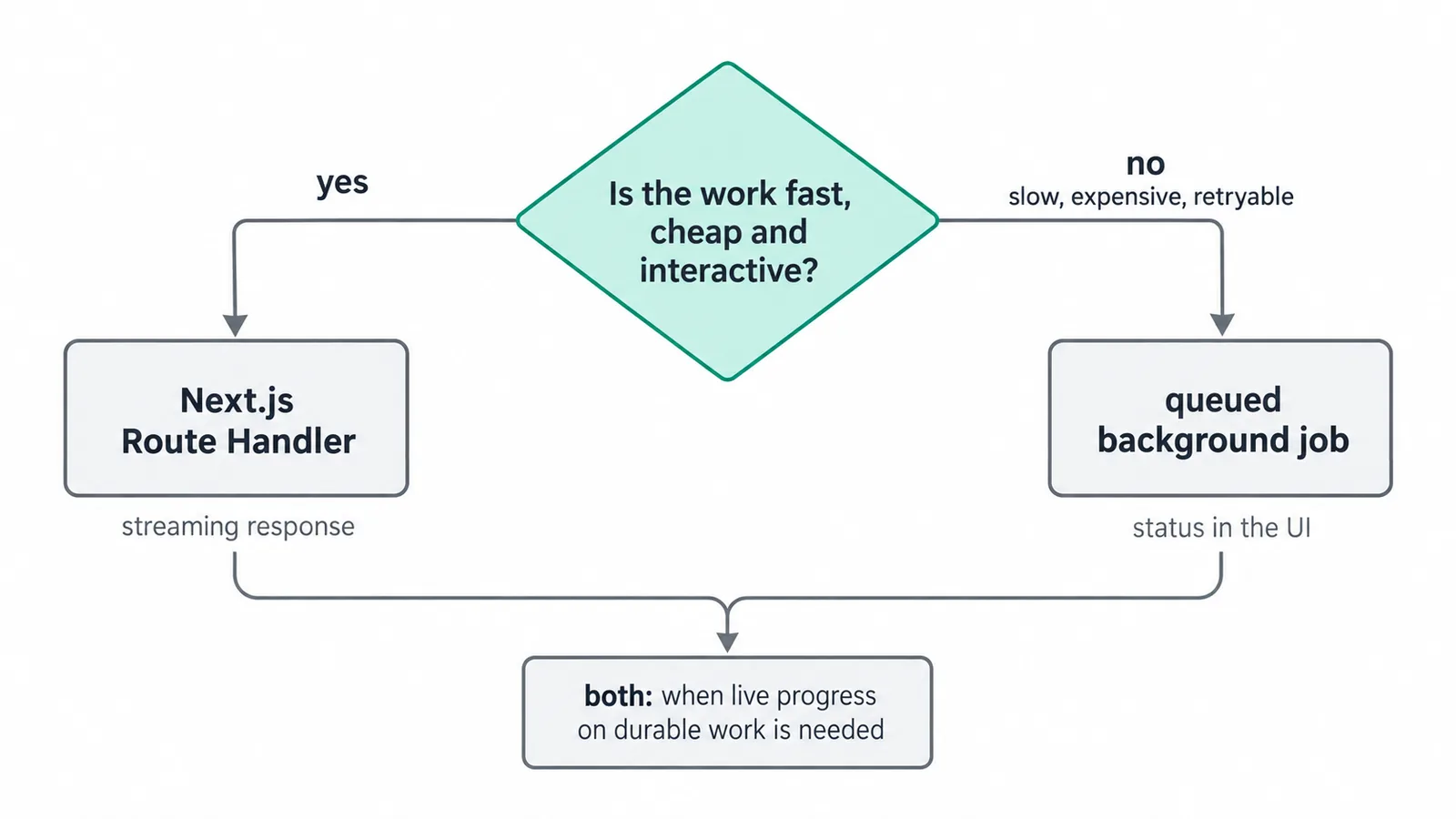
Figure 2: Request versus job decision — stream for interactive drafts, queue for durable work, both when live progress on durable work is needed.
Authentication, Organizations, And Permissions Come First
AI does not reduce the need for boring SaaS foundations. It increases it.
If your product supports teams, you need a clear tenant model. Users belong to organizations. Organizations own workspaces, files, projects, credits, subscriptions, API keys, and audit records. Every AI request must be scoped to the current tenant.
A common mistake is implementing retrieval over shared indexes without strong permission filtering. If user A can retrieve user B's content because embeddings were not tenant-scoped, the AI layer has turned a data modeling shortcut into a serious product risk.
A strong baseline includes:
- Organization-scoped database rows
- Role-based permissions for sensitive actions
- Tenant-aware file storage paths or metadata
- Retrieval filters that enforce access rules before generation
- Audit logs for important AI actions
- Explicit ownership checks in service functions, not only UI guards
Authorization should live in backend service boundaries. The UI can hide controls, but it cannot be the enforcement layer.
Billing And Usage Need To Be Designed With AI Costs In Mind
Traditional SaaS billing often maps cleanly to seats, plans, storage, and feature flags. AI SaaS adds variable cost. A single user can generate significant provider usage through prompts, files, automations, or retries.
That means usage tracking is not a reporting feature. It is part of the architecture.
Track usage at the level you need to enforce policy:
- Organization
- User
- Feature
- Model/provider
- Request type
- Tokens or provider-reported units where available
- Job ID or workflow ID
- Billing period
Then define clear limits. Some products need hard caps. Others need soft warnings, approval flows, or overage billing. The right model depends on your pricing strategy, but the engineering system needs accurate records either way.
Do not wait until invoices are wrong to add usage metering. Add it before launch.
Record usage by organization, user, feature, model/provider, tokens or provider-reported units, job ID and billing period. Enforce with hard caps, warnings, approvals or overage rules to match your pricing. Expose usage in billing, support and admin views so every invoice can be explained.
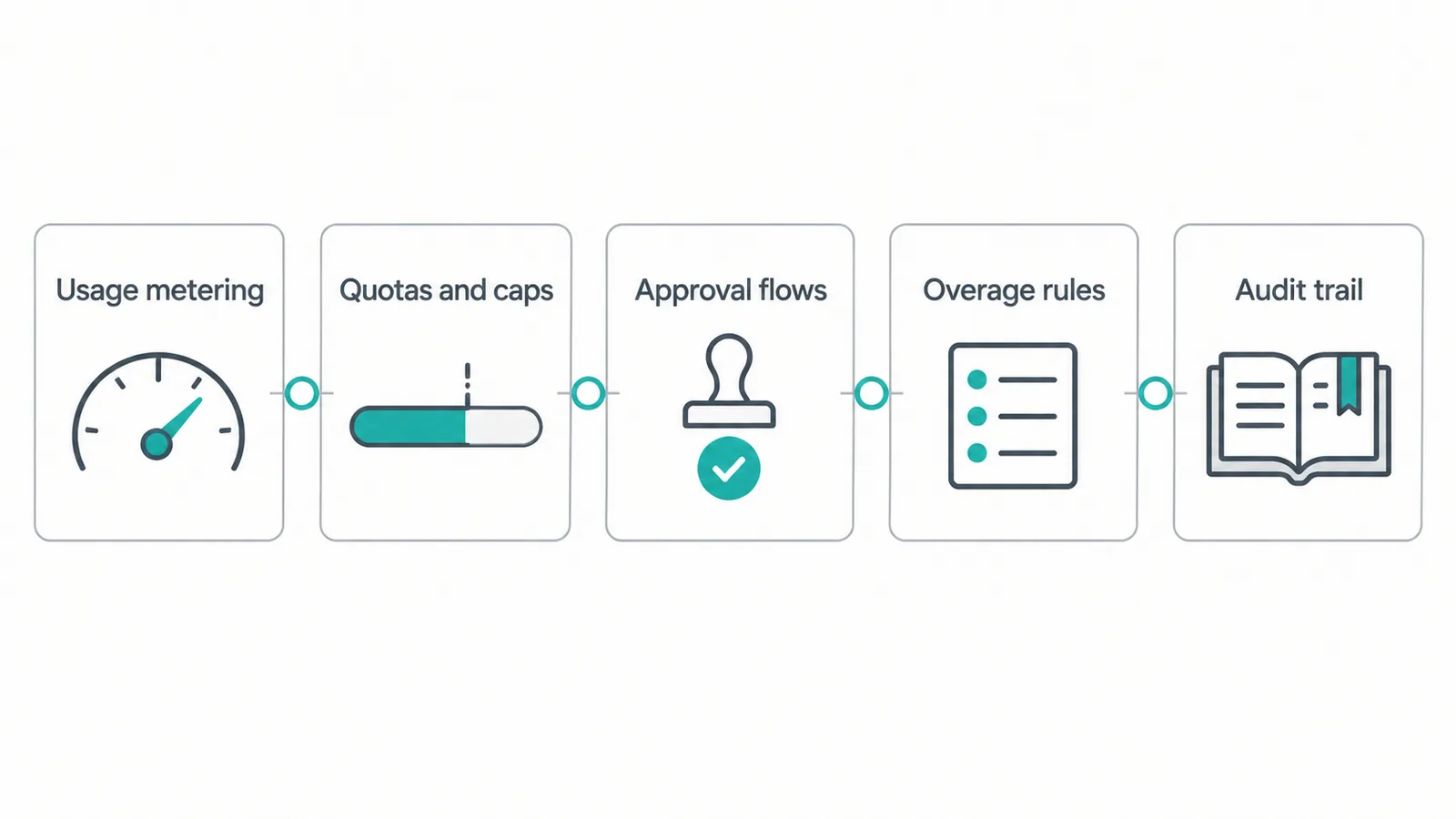
Figure 3: AI SaaS billing guardrails — usage metering, quotas, approvals and audit trail keep every invoice explainable.
How this maps to delivery: AI development and web development, with scope and pricing in Services & prices.
Provider Access Should Be Controlled, Not Sprinkled Everywhere
A practical Next.js AI SaaS architecture should avoid direct provider calls from random parts of the codebase. Create an internal AI gateway or orchestration module that owns provider access.
That layer should handle:
- Model selection
- Provider credentials
- Request timeouts
- Retries and fallback policy
- Prompt templates
- Input redaction where required
- Output validation
- Cost recording
- Logging and tracing
- Safety and product-specific constraints
This does not need to be over-engineered. It can start as a TypeScript service module. The key is that product code calls your interface, not the provider SDK directly.
For example, a product service should call something like generateProjectSummary({ organizationId, projectId }), not assemble a prompt and call a model API inline. That gives you one place to change models, add tracing, enforce usage limits, or block unsafe request shapes.
Streaming Is A UX Feature, Not An Architecture Strategy
Streaming responses can make AI interfaces feel faster. It is useful for chat, drafting, summarization, and assistant-style workflows.
But streaming should not be confused with durability. If the user closes the tab, refreshes, loses network, or hits a provider timeout, what should happen? For important work, save the job and its intermediate state. Use streaming as a presentation layer over a durable operation when the output matters.
A good rule:
- Use streaming for low-risk, interactive generation.
- Use jobs for important, expensive, or long-running work.
- Use both when users need live progress on durable work.
For example, generating a quick email draft can stream directly. Processing 400 documents into a structured knowledge base should run through a queue, persist progress, and expose status to the UI.
Retrieval Needs Permissions, Freshness, And Source Discipline
Retrieval-augmented generation is common in AI SaaS, but production retrieval is more than embeddings.
You need to answer practical questions:
- Who is allowed to retrieve this source?
- How is the source chunked?
- When was it indexed?
- What happens when the source is deleted?
- Can the model cite where the answer came from?
- How do you handle stale embeddings?
- Do different content types need different parsing rules?
For many products, Postgres plus object storage plus a vector index is enough. The harder part is lifecycle management. When a document changes, your index must reflect that. When a user loses access, retrieval must respect it. When a source is deleted, derived chunks and embeddings need cleanup.
A credible AI product should also show source references when answers depend on customer content. This improves trust and gives users a way to verify outputs.
Evals Are Part Of The Product System
AI features can regress without a code error. A prompt change, provider update, retrieval tweak, or model migration can alter behavior. That means production AI SaaS needs evaluations.
Start small. You do not need an academic benchmark. You need product-specific checks.
Useful eval examples:
- Does the summary include required fields?
- Does the answer cite only allowed sources?
- Does the output match a JSON schema?
- Does the classifier choose one of the permitted labels?
- Does the workflow avoid making unsupported claims?
- Does the generated draft preserve key customer-provided facts?
Store representative input/output cases. Run them before prompt changes and provider migrations. Add human review for workflows where correctness matters.
Treat prompts like production code. Version them, review them, test them, and roll them back when needed.
Observability Must Include AI-Specific Signals
Ordinary logs are not enough. You need to see what happened across the full AI request path.
At minimum, capture:
- Request ID
- Organization ID
- User ID where appropriate
- Feature name
- Provider and model
- Latency
- Token or usage information when available
- Cost estimate or billing unit
- Prompt/template version
- Retrieval source IDs
- Job ID
- Error category
- Output validation result
Be careful with raw prompts and outputs. Some products can log them safely with customer consent and retention controls. Others should store redacted traces or metadata only. Make this an explicit product and security decision.
The goal is not to collect everything. The goal is to debug failures, control cost, understand behavior, and improve quality without creating unnecessary data exposure.
Practical Production Checklist
Use this checklist before treating an AI feature as production-ready:
- [ ] Every AI request is authenticated and tenant-scoped
- [ ] Authorization is enforced in backend services
- [ ] Usage is recorded before or during provider execution
- [ ] Expensive actions have limits, quotas, or approval paths
- [ ] Provider calls go through a controlled internal interface
- [ ] Long-running work runs in durable background jobs
- [ ] Retries are bounded and idempotent where needed
- [ ] Outputs are validated before being stored or acted on
- [ ] Retrieval respects permissions and deletion lifecycle
- [ ] Prompt versions are tracked
- [ ] Basic evals exist for important workflows
- [ ] Logs and traces include AI-specific metadata
- [ ] Billing, support, and admin views can explain usage
- [ ] Failure states are visible to users and operators
This checklist is intentionally ordinary. Production quality usually comes from disciplined fundamentals, not exotic architecture.
Example: AI Document Review SaaS
Consider a product that reviews uploaded contracts and produces structured risk notes. A weak architecture would upload the file, parse it inside a request handler, call a model directly, and render the response.
A stronger version looks like this:
- User uploads a file to tenant-scoped storage.
- The app creates a document record and an ingestion job.
- A worker parses the document, extracts text, chunks content, and stores source references.
- The system records usage for ingestion and review actions.
- A review job retrieves relevant chunks with tenant filters.
- The AI orchestration layer calls the selected provider with a versioned prompt.
- The output is validated against a schema.
- Results are stored with source citations and review status.
- The UI shows progress, results, warnings, and retry options.
- Observability connects the upload, ingestion, retrieval, model call, and final report.
This is still a manageable architecture. It just respects the fact that production AI work is asynchronous, permissioned, metered, and observable.
Example: AI Assistant Inside A SaaS Dashboard
Now consider a dashboard assistant that helps users analyze project activity.
The assistant should not receive unrestricted database access. Instead, create specific tools or service functions it can call:
getProjectStatuslistRecentMilestonessummarizeOpenRisksdraftClientUpdate
Each function enforces permissions and returns bounded data. The model can help compose an answer, but it does not become a privileged database user. This approach is easier to secure, test, and explain.
For buyer-facing SaaS, this matters. Customers will ask how AI accesses their data. A controlled tool layer is a stronger answer than vague assurances about prompts.
What To Avoid
Several patterns create avoidable risk:
- Calling model providers directly from UI components
- Treating prompts as unversioned strings scattered through the app
- Running document processing inside web requests
- Building retrieval without tenant filtering
- Adding billing after usage has already scaled
- Logging sensitive prompts without a retention policy
- Letting AI actions mutate customer data without validation or review
- Depending on one provider without clear timeout and failure behavior
None of these issues are unusual. They appear when teams move from prototype to production without changing the architecture.
The Buyer Perspective
Founders and CTOs should also think about what serious customers will evaluate. They may not care which framework you use, but they will care whether the product is reliable, explainable, and operationally mature.
A credible AI SaaS can answer these questions:
- How do you prevent one customer from accessing another customer's data?
- How do you control AI costs and usage abuse?
- What happens when a provider is slow or unavailable?
- Can users see where an answer came from?
- Can admins understand usage by team or feature?
- How do you test AI behavior before changes go live?
- How do you handle failed jobs and retries?
Your architecture should make those answers straightforward.
Final Blueprint
The practical blueprint is simple: build a normal SaaS foundation, then add AI behind controlled boundaries.
Use Next.js for the product experience. Use a real tenant model. Centralize provider access. Put long-running work into jobs. Track usage from the start. Treat retrieval as a permissioned data system. Add evals for important workflows. Make observability useful for cost, quality, and support.
That is the difference between an impressive demo and a product that can survive real customers.
If you are planning a production AI product and want the engineering foundation designed correctly from the start, explore CodeAustral's work in AI solutions and web development. For a related stack-level view, read Next.js Production Stack 2026.
When you are ready to scope the work, Build my estimate, compare Services & prices, or See all work.