

Artificial Intelligence is now a practical part of web products: smarter search, personalized recommendations, conversational support and assisted content creation.
This guide shows a production-safe path: define one use case, choose a provider, keep keys server-side, add rate limits and caching, stream where it helps, and plan fallbacks. Check current provider docs before you build.
How to add chat, search, recommendations and image generation to a web app — with server-only API calls, streaming, caching and fallbacks that hold up in production.
If you need scoping help, see AI development and Capabilities, then Build my estimate or Send a brief. Explore Services and Managed AI operations, try Functional AI demos, and See all work.
Why AI Integration Matters
- Enhanced User Experience: smart search, personalized recommendations, conversational interfaces
- Automation: support triage, content moderation, data analysis
- Competitive Edge: AI features that solve a specific job
- Scalability: handle more volume without proportional headcount
Step-by-Step Integration Guide
Step 1: Define Your Use Case
One job, one success metric, one human-review rule. Example: answer product questions from your own docs, with escalation to support.
Step 2: Choose Your AI Provider
Compare capabilities, latency, API stability, data-privacy terms and pricing. Verify in current docs: OpenAI docs and Anthropic docs
Step 3: Architecture Design
Never call AI APIs from the browser. Use a server route, store keys in server env, add auth, rate limiting and logging. Cache repeatable queries.
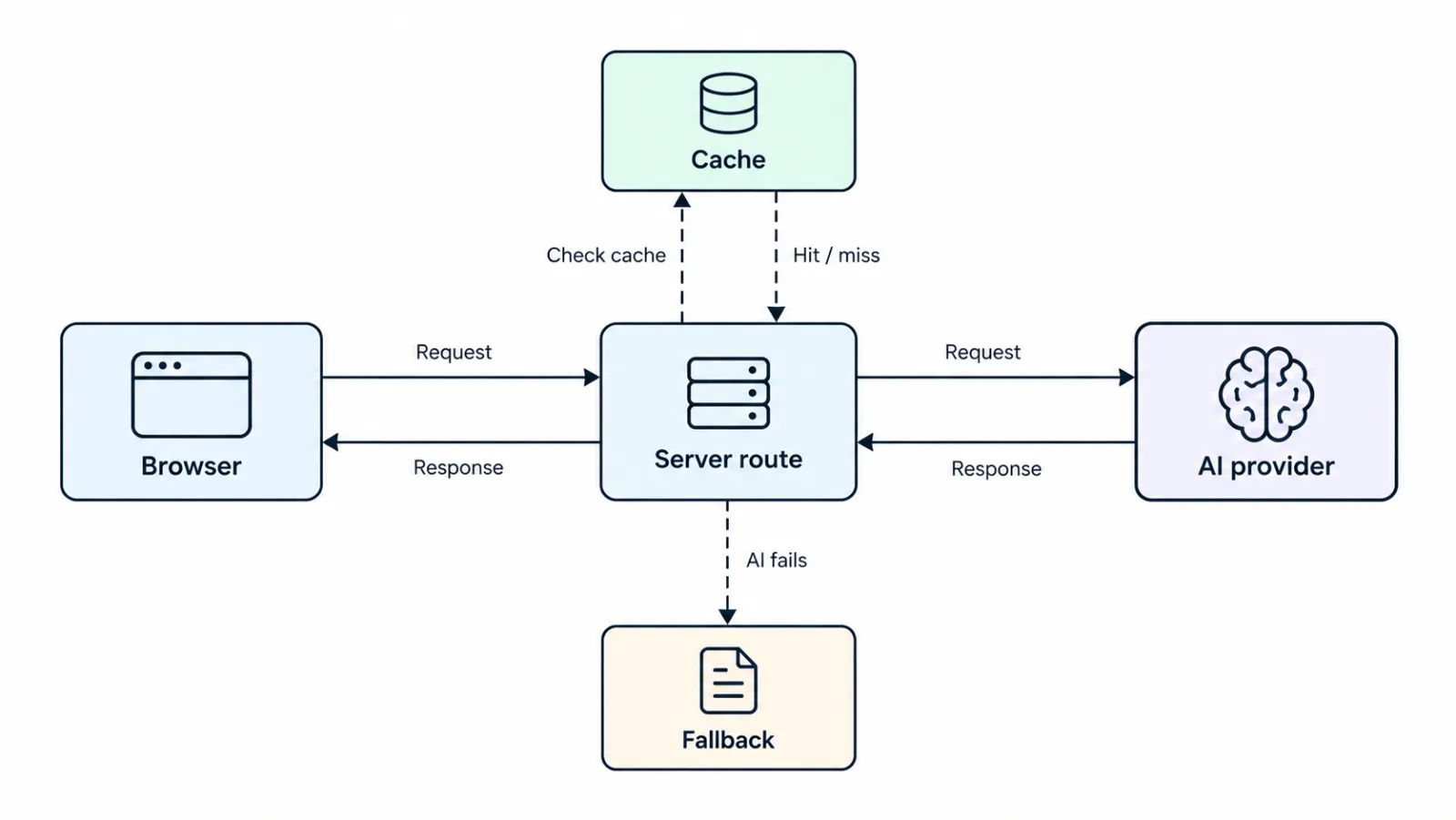
Server-only AI integration: the browser calls a server route, which checks cache, calls the AI provider, and returns a fallback when the provider fails.
Step 4: Implementation
Use async processing, stream long responses, validate and sanitize input, return safe fallback if provider fails.
// POST /api/ai-assist - server only, key never reaches browser
export async function POST(req) {
  const { prompt } = await req.json();
  if (!prompt || prompt.length > 2000) return Response.json({error:'Invalid input'},{status:400});
  // check auth + rate limit, check cache, then call provider
  // stream response, catch errors and return fallback
  return Response.json({ answer: 'Fallback: try again or contact support.' });
}
Verify model, SDK and parameters in current provider docs at build time.
Step 5: Prompt Engineering
Version prompts, test edge cases, ground with your data, review outputs.
Best Practices for Production
Security
- Never expose API keys; auth plus rate limit; validate and sanitize inputs; log without storing PII
- Implement authentication and rate limiting
- Validate and sanitize user inputs
Performance
- Async plus streaming; cache common queries; set timeouts and retries; fallback responses; monitor latency, error rate and cost per request
- Use async processing and streaming
- Cache common queries
- Have fallback responses for API failures
What to send in your brief
Your use case in 2 sentences, your data source, expected volume, and how you want failures to behave. That is enough for a clearer read before building.
Conclusion
AI integration can transform your web application. Start with a clear use case, choose the right provider, and always prioritize security and user experience.
At CodeAustral, I work on AI integrations for web products when they need more than a quick API hookup. If you are planning an AI feature and want a clearer read before building it, send a brief.