

Every founder who decides to build a mobile product runs into the same fork in the road within the first week: native or cross-platform. In 2026 that question almost always crystallizes into SwiftUI versus React Native. We build both at CodeAustral, often for the same client, and the honest answer is that neither one is the "right" choice in the abstract. The right choice falls out of your team, your timeline, and the kind of product you are actually shipping.
This is a working comparison, not a benchmark beauty contest. We will go through performance, native feel, team and hiring, time-to-market, and long-term maintenance, and end with a decision framework you can apply to your own situation.
The state of both stacks in 2026
SwiftUI is now mature enough to be the default for net-new Apple development. It covers the surface area UIKit used to own, the previewing and live-editing story is solid, and Swift's concurrency model (async/await, actors) is no longer experimental. If you are building for iPhone, iPad, Apple Watch, and Vision Pro from one codebase, SwiftUI is the only first-party way to do it well.
Figure 1 below compresses that state into one picture: one Apple-only stack with direct framework access, one cross-platform stack on the New Architecture, and the team shapes each one favors.
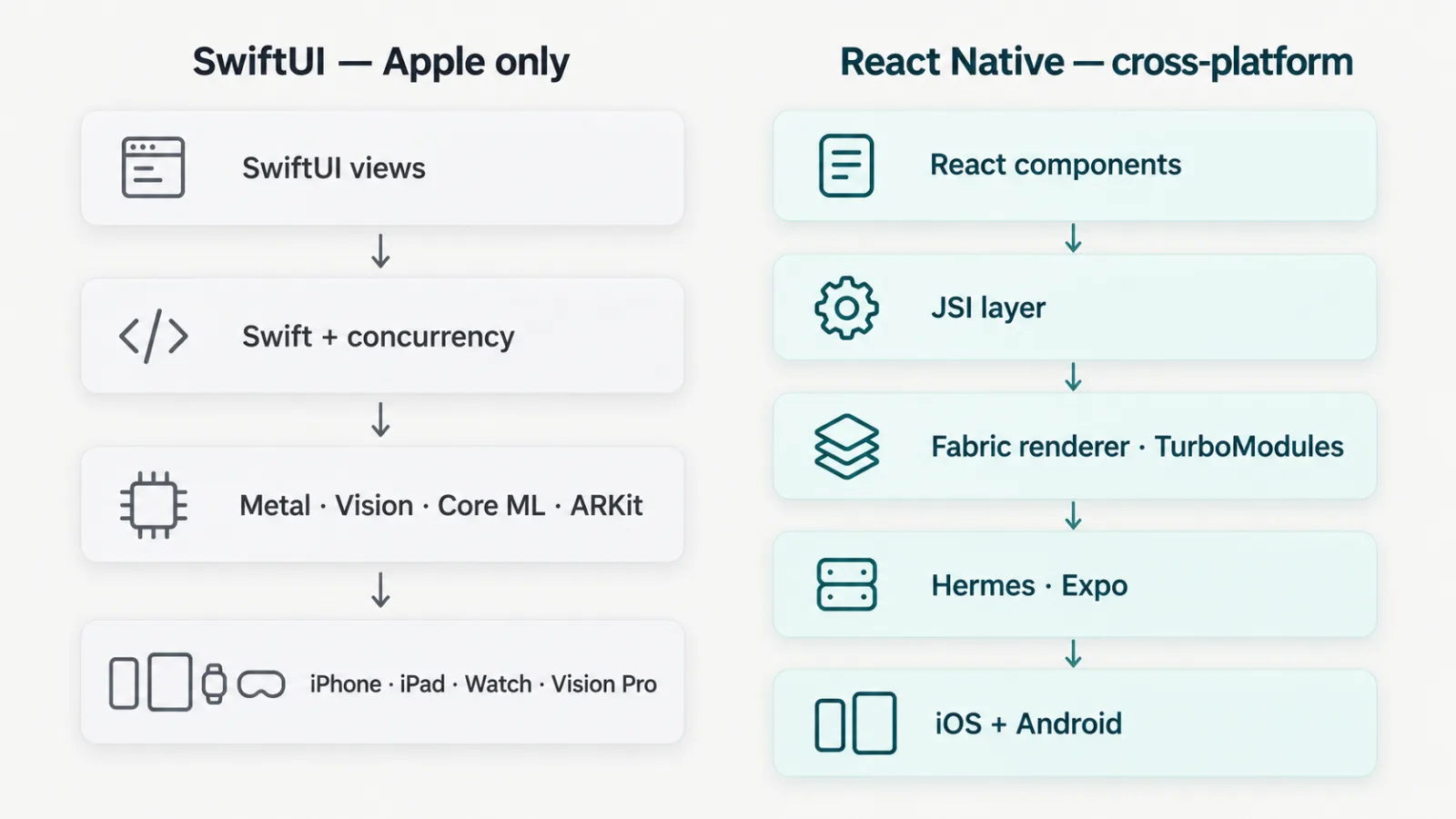
Figure 1. SwiftUI reaches Apple frameworks directly; React Native reaches both platforms through the JSI layer, Fabric renderer, TurboModules, Hermes and Expo.
React Native, meanwhile, ships on its New Architecture by default. The old asynchronous bridge is gone, replaced by the JSI layer with Fabric (the renderer) and TurboModules (native modules loaded lazily). With Hermes as the standard JavaScript engine and Expo as the de facto framework for most teams, React Native in 2026 is a far cry from the bridge-stuttering reputation it earned years ago. The serious questions today are about ecosystem maturity and platform feel, not raw viability.
A benchmark protocol before choosing a stack
No side-by-side benchmark was run for this article. The architecture diagrams are planning heuristics, not measured ties or performance guarantees. The React Native 0.82 release documents its New Architecture-only runtime; that change alone cannot predict your screen's frame time.
Use the same release-mode workload, assets and data on the same physical device. Record the device, OS, stack and dependency versions, build settings and thermal conditions. Separate a cold launch from a warm navigation; run each repeatedly and retain the individual observations, not only the best run.
| Workload | Measurement to retain | Decision boundary |
|---|---|---|
| Launch and navigation | Cold/warm duration, memory and device conditions | Compare equal release builds, not a debug simulator against a phone |
| Long scrolling list | Frame-time distribution and dropped frames with identical rows | Check the slow tail and accessibility settings, not just average FPS |
| Camera or local inference | End-to-end latency, sustained memory and thermal behavior | Include the actual native modules, model and input size |
| A task the app sells | Completion errors, recovery and user-visible delay | Faster rendering does not establish a correct product result |
Define an acceptable boundary with the product owner before measuring. Keep results and failures linked to their build, investigate regressions, and repeat on a lower-end device before generalizing. This is an original proposed protocol; it reports no SwiftUI-versus-React-Native numbers or customer outcome.
Performance: where the gap is real and where it isn't
Forms, lists, navigation and network-bound CRUD can work well on either stack. A 60 or 120 fps target depends on the device, screen, workload and implementation; neither framework guarantees it. Measure the actual release build before calling two implementations equivalent.
The gap shows up at the edges:
- Heavy animation and gesture-driven UI. SwiftUI talks directly to Core Animation and Metal. React Native gets very close with Reanimated running animations on the UI thread, but truly bespoke, physics-heavy interaction is easier to nail natively.
- Sustained compute on-device. Real-time camera processing, on-device ML, audio DSP, AR. SwiftUI wins because you are one import away from Vision, Core ML, ARKit, and Metal without a custom native module.
- Cold start and memory. Native has a structural edge — there is no JS engine to warm up. Measure launch and memory on the target device before deciding whether that difference matters.
If your product's core loop is a camera, a game-like surface, AR, or heavy local inference, the native advantage is not theoretical. For content, commerce, booking, dashboards and social apps, measure the target workload and weigh staffing, accessibility and platform reach alongside performance.
Figure 2 is a planning heuristic: compare ordinary app workloads on both stacks, then investigate whether direct Metal, Vision, Core ML or ARKit access fits the product. Its “ties” label is a hypothesis to test, not a benchmark result.
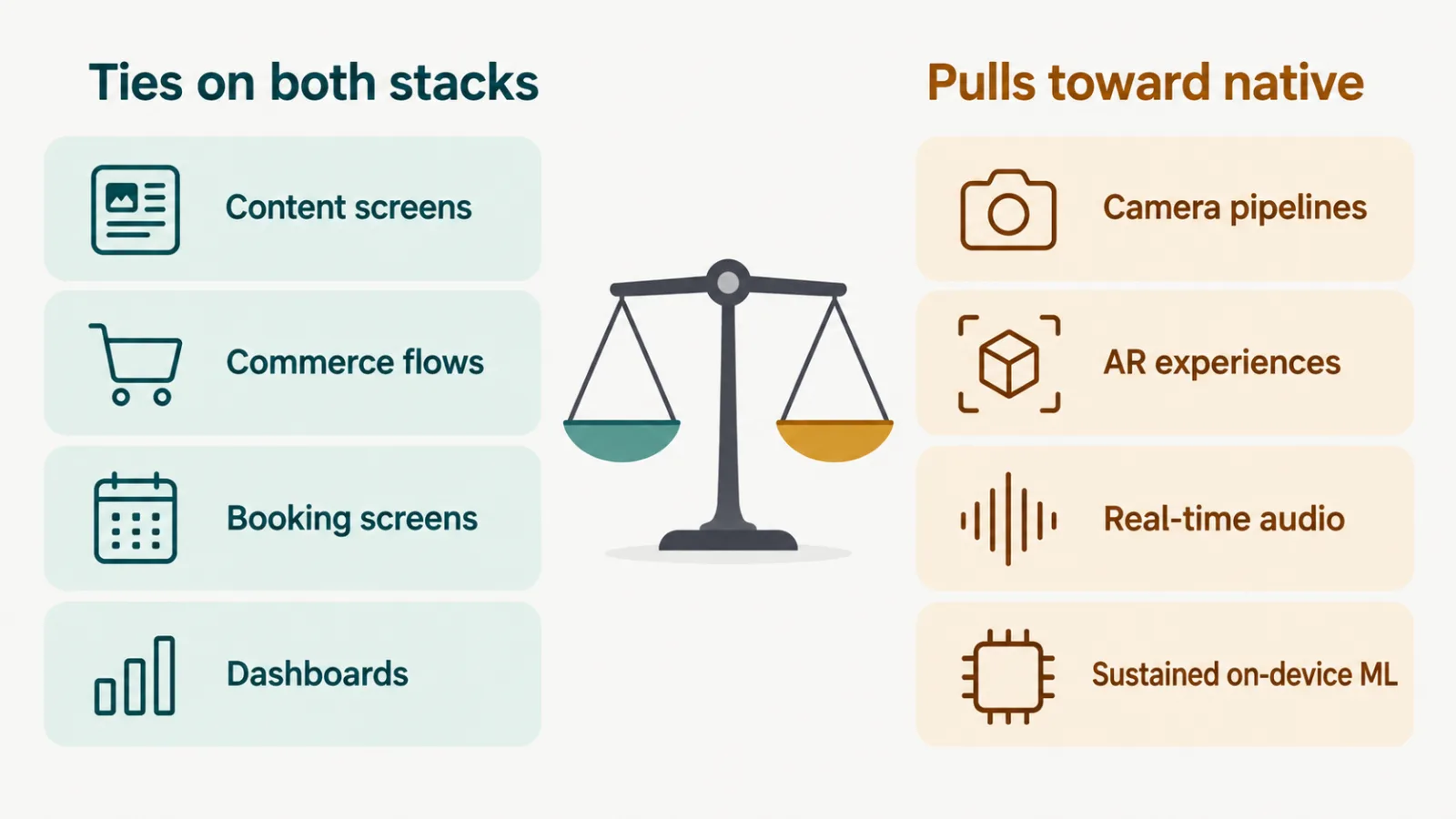
Figure 2. Planning heuristic: compare ordinary app screens, then investigate camera, AR, real-time audio and sustained on-device ML separately. The diagram reports no measured tie.
Native feel and platform fit
This is the most underrated factor and the one founders judge after launch. iOS users have a finely tuned sense for what feels "right" — scroll deceleration, the swipe-back gesture, sheet behavior, haptics, context menus, Dynamic Type, Dynamic Island.
SwiftUI gets all of this for free because it *is* the platform. React Native can match it, but each detail is a decision: do you adopt the right gesture library, respect Reduce Motion, wire up haptics, support large accessibility text? Expo and the community libraries make this achievable, but "achievable" means someone has to do it and keep doing it.
A useful rule: the closer your product sits to the OS (widgets, Live Activities, Shortcuts, Watch complications, share extensions), the more SwiftUI's gravity pulls you in. The closer it sits to your own brand world that looks identical on every device, the less the platform-native polish matters and the more cross-platform pays off.
Team, hiring, and code reuse
This is where most decisions are actually made, even when founders pretend they are made on performance.
- You have web/JS engineers already. React Native lets them ship mobile. The mental model — components, props, hooks, a familiar package ecosystem — transfers directly. This is the single biggest reason React Native wins inside startups.
- You are iOS-only and want the best possible app. Hire Swift engineers and build native. You will move faster than you expect because you are fighting fewer abstraction leaks.
- You need iOS and Android from day one with a small team. React Native's one codebase is decisive. Maintaining two native apps with a three-person team is a tax most early companies cannot afford.
On hiring: strong Swift engineers are scarcer and command higher rates, but the talent that exists tends to be deep. React Native draws from the enormous React labor pool, so it is easier and cheaper to staff and to replace. For a venture-backed team that needs to grow headcount fast, that liquidity is a real strategic asset.
Time-to-market
If you need to be on both platforms, React Native is the faster path to a launchable v1 — frequently by months. One team, one codebase, over-the-air updates for JS changes (via Expo Updates or CodePush-style tooling) so you can ship fixes without waiting on App Store review.
If you are iOS-first and your team already knows Swift, native is competitive and sometimes faster, because you skip the cross-platform abstraction tax: no bridging modules for that one SDK that only ships a native package, no debugging a layout that renders differently on Android.
Here is a compact technical illustration of how close the day-to-day developer experience now is. The same "fetch and render a list" screen:
// React Native (Expo) + TypeScript
import { FlatList, Text } from "react-native";
import { useQuery } from "@tanstack/react-query";

type Dish = { id: string; name: string };

export function Menu() {
  const { data = [] } = useQuery({
    queryKey: ["menu"],
    queryFn: (): Promise<Dish[]> =>
      fetch("https://api.example.com/menu").then((r) => r.json()),
  });

  return (
    <FlatList
      data={data}
      keyExtractor={(d) => d.id}
      renderItem={({ item }) => <Text>{item.name}</Text>}
    />
  );
}
// SwiftUI + Swift concurrency
struct Dish: Identifiable, Decodable { let id: String; let name: String }
struct MenuView: View {
@State private var dishes: [Dish] = []
var body: some View {
List(dishes) { Text($0.name) }
.task {
let url = URL(string: "https://api.example.com/menu")!
let (data, _) = try! await URLSession.shared.data(from: url)
dishes = try! JSONDecoder().decode([Dish].self, from: data)
}
}
}Two different languages, nearly identical effort. The divergence is not in the simple screens; it is in the hundredth screen, the third SDK integration, and the platform-specific edge cases.
Maintenance and the long game
The cost of a mobile app is not the build; it is the next five years of upkeep. Each stack ages differently.
- React Native lives on a fast-moving dependency tree. Major upgrades (especially the New Architecture migration) require real effort, and a transitive native dependency can break on a new iOS or Android release. Expo absorbs a large share of this pain by curating compatible versions — staying inside the Expo-managed workflow is the single best maintenance decision a React Native team can make. Outside it, upgrades get expensive.
- SwiftUI rides Apple's annual release cadence. APIs are generally additive and back-compatible, but new SwiftUI capabilities are gated behind iOS version availability, so you carry
if #availablebranches and a minimum-deployment-target decision. The dependency surface is smaller, which means fewer things break unexpectedly.
The blunt version: React Native's maintenance risk is breadth (many moving third-party parts), SwiftUI's is depth-on-one-vendor (you move when Apple moves). Neither is free.
A decision framework for founders
Run your product through these questions in order. The first strong "yes" usually decides it.
- Is the core experience camera, AR, real-time audio/video, on-device ML, or a custom game-like surface? If yes, lean SwiftUI (native).
- Do you need iOS and Android at launch with a small team? If yes, lean React Native.
- Is your existing team primarily web/JavaScript? If yes, React Native multiplies their output immediately.
- Is iOS your only platform for the foreseeable future and is best-in-class polish a competitive edge? If yes, native.
- Do you depend heavily on OS surfaces — widgets, Live Activities, Watch, Shortcuts, deep system integration? If yes, the native pull is strong.
- Is speed to a launchable cross-platform v1 the dominant constraint? If yes, React Native.
Figure 3 turns the six questions above into a single flowchart you can walk in order; the first strong yes usually decides it.
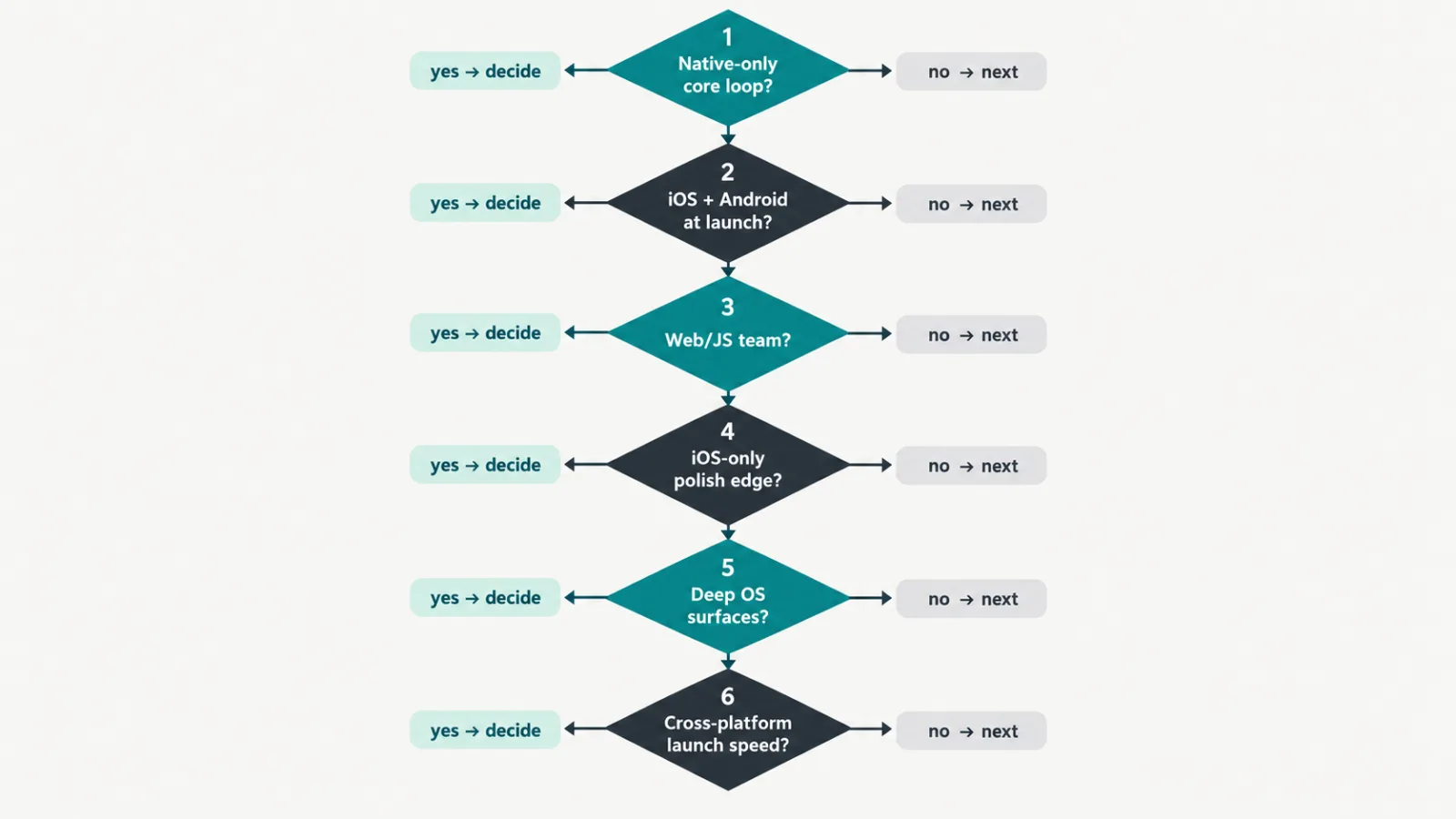
Figure 3. Walk the six questions in order: native-only core loop, launch platforms, existing team, polish as edge, OS surfaces, launch speed.
For most restaurant-tech, marketplace, booking, and content products we ship, React Native with Expo is the pragmatic winner: two platforms, one team, fast iteration, and a feel that is more than good enough when the UI is your own branded world rather than a system-chrome clone. For camera-first, AR, hardware-adjacent, or Apple-ecosystem-deep products, we build SwiftUI and do not look back.
What we steer clients away from is the false economy of choosing native "for performance" on a product that is fundamentally a database with screens, or choosing cross-platform "to save money" on a product whose entire value is a buttery native camera.
Frequently Asked Questions
Is React Native still slower than native in 2026?
This article reports no comparative timings. Architecture changes do not establish that two apps perform equally. Run the same release-mode workload on the same physical device, retain frame times, launch duration and memory, and investigate the slow tail before choosing a stack.
Can one React Native codebase really serve both iOS and Android well?
Yes, for most product categories, especially with Expo handling native configuration and updates. The caveat is platform-specific polish: gestures, haptics, and accessibility need deliberate attention to feel right on each OS. Hardware-heavy features may still require custom native modules, which erodes the single-codebase advantage on those screens.
Which is cheaper to hire for and maintain?
There is no universal cheaper stack. Compare the same app scope, platform coverage, available team, dependency upgrades, native-module work and ongoing support. Obtain comparable proposals and separate initial build from maintenance instead of treating a framework choice as a labor-market price.
Should a startup with web developers default to React Native?
Usually yes. Existing React knowledge transfers almost directly, so your team ships mobile without learning a new language or ecosystem from scratch. The main exceptions are products whose core value is a native-only capability like advanced camera, AR, or on-device ML, where investing in Swift talent pays off in quality and velocity.
Does choosing SwiftUI lock me out of Android forever?
Effectively yes for that codebase, since SwiftUI does not target Android. If Android becomes necessary later, you would build a separate native Android app or rewrite cross-platform. That is why the platform question belongs at the start of the decision, not after launch, when a rewrite is far more expensive.
What do SwiftUI vs React Native performance benchmarks show in 2026?
No side-by-side benchmark was run for this article. Use the proposed same-device release-build protocol to record launch, scrolling, camera or inference workloads and task failures. The diagrams are planning heuristics; they do not report measured ties, frame-rate guarantees or customer outcomes.
How does developer experience compare: SwiftUI previews vs React Native hot reloading?
Compare the iteration loop your team can reproduce: change one component, record the time until the updated screen appears, check state resets and failures, and repeat on the same project. This article has not timed editor workflows. Platform needs, debugging and team familiarity belong beside speed in the decision.
Working with CodeAustral
We have shipped both SwiftUI and React Native products for clients across restaurant tech, marketplaces, and AI tools, which means we have no incentive to push you toward whichever stack we happen to prefer. If you are weighing this decision for your own product, send us a short brief describing what you are building, your team, and your timeline — we will tell you honestly which path fits and why, or compare engagement models.