

Short answer
A restaurant technology integration roadmap should connect systems in risk-ranked phases, starting with the data and workflows that affect every order. Begin with menu and product data, then connect ordering and payments, route reliable tickets to the kitchen, synchronize availability, unify customer data, and finally build decision-ready analytics. At each phase, define one source of truth, measurable failure conditions, ownership, and a rollback plan.
The goal is not to connect every tool as quickly as possible. The goal is to create a dependable operating system for the restaurant business without disrupting service.
Why restaurant integrations fail
Restaurant technology projects often begin with a list of platforms: point of sale, online ordering, delivery marketplaces, kitchen display system, payment provider, inventory tool, loyalty platform, customer relationship management system, and reporting stack. The list is useful, but it is not a roadmap.
An integration fails when the business process is unclear underneath the software. A menu item may have different names, prices, modifiers, tax rules, or availability states in different systems. An order may be accepted online but fail to reach the kitchen. A payment may succeed while the order status remains open. A customer record may be duplicated across channels, making retention reporting unreliable.
These are not isolated technical defects. They are failures in ownership, data contracts, state management, and operational recovery.
A credible roadmap answers five questions for every connection:
- Which system owns the data?
- Which events or records must be synchronized?
- How quickly must the update happen?
- What happens when the receiving system is unavailable?
- Who can diagnose and recover the workflow during service?
The target architecture
A typical restaurant integration landscape has several categories of systems:
| Capability | Typical responsibility | Integration concern |
|---|---|---|
| Menu and product catalog | Items, modifiers, prices, taxes, allergens, availability | Conflicting definitions and incomplete updates |
| POS and order management | Order lifecycle, payments, discounts, refunds | State consistency and reconciliation |
| Ordering channels | Web, app, kiosk, phone, delivery marketplaces | Duplicate logic and channel-specific limits |
| Kitchen systems | Ticket routing, preparation status, throttling | Lost, duplicated, or delayed tickets |
| Inventory and availability | Stock levels, item suspension, location status | Stale availability and overselling |
| CRM and loyalty | Profiles, consent, segments, offers | Identity matching and privacy controls |
| Analytics | Revenue, operations, customer, and product reporting | Inconsistent definitions and missing events |
The architecture should make the system boundaries explicit. In many businesses, the POS remains the operational system of record for orders and payments. A dedicated product catalog may own menu structure. An ordering layer may coordinate channel behavior. An event or integration layer can move data between systems, apply transformations, retry failed deliveries, and record an audit trail.
That arrangement is not universal. The correct ownership model depends on the restaurant group, existing contracts, operational constraints, and the capabilities of each platform. What matters is that ownership is deliberate rather than accidental.
For broader implementation context, see restaurant technology services and the services overview.
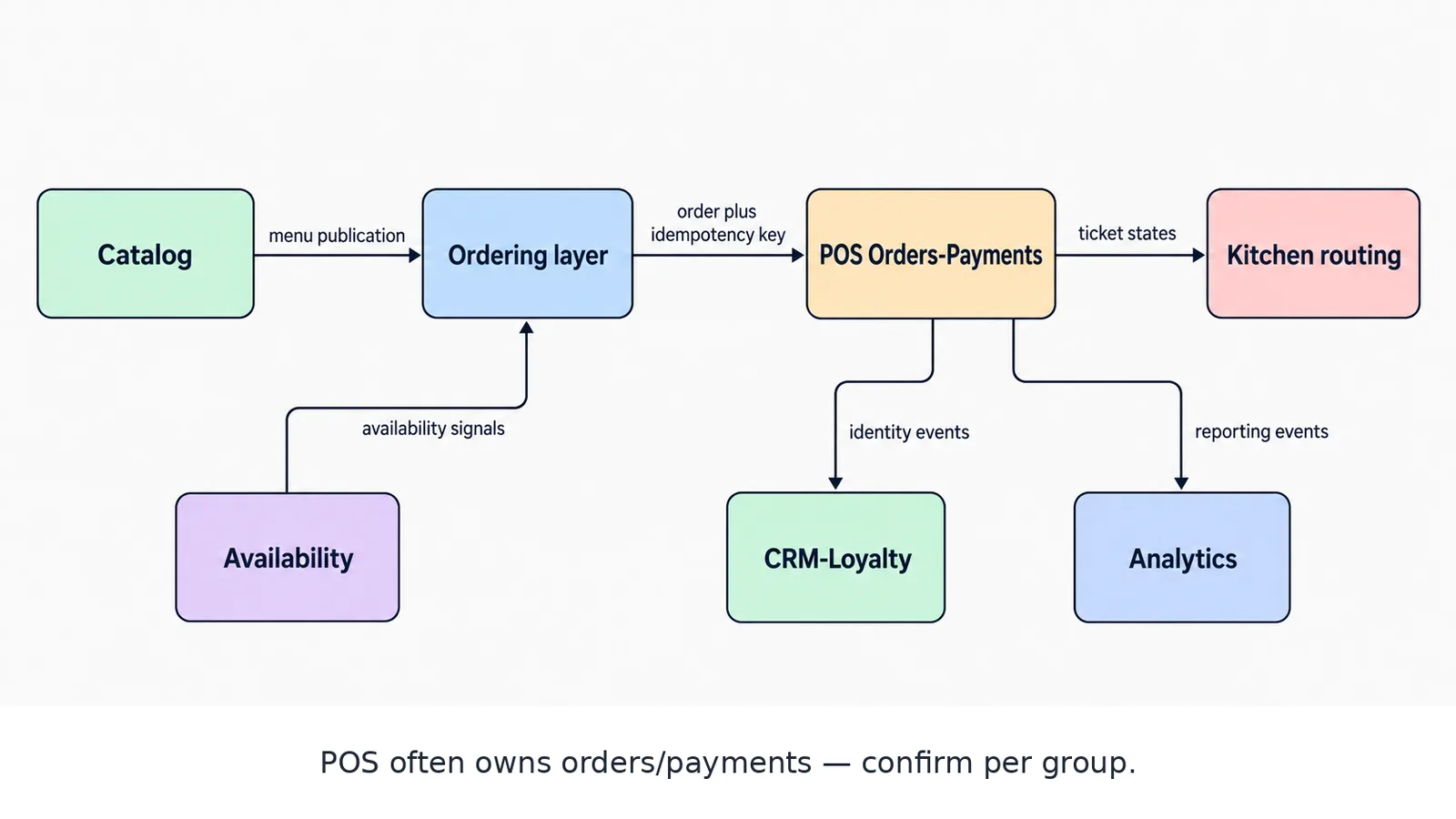
Each capability needs one owner and one failure rule. Ownership is deliberate, not accidental.
Phase 0: Map the business-critical flows
Before building integrations, document the flows that cannot fail during service. At minimum, map:
- Menu publication from a source system to each selling channel.
- Order creation from channel to POS or order management.
- Payment authorization, capture, refund, and cancellation.
- Ticket creation and routing to the correct kitchen station.
- Item and location availability updates.
- Customer identity and consent capture.
- Operational and financial reporting.
For each flow, record the trigger, payload, owner, expected timing, failure behavior, and reconciliation method. Include manual workarounds. A workaround that staff already understand may be safer than a new automated fallback introduced without training.
A practical example: if a kitchen printer stops receiving tickets, the fallback should be specific. Staff may need to pause online ordering, switch to a designated printer, or use a dashboard to reprint unacknowledged orders. “Retry automatically” is not an operational plan unless someone can see the retry state and resolve the underlying issue.
Phase 1: Establish menu and product truth
Menu data is the foundation of the integration roadmap. Every downstream workflow depends on consistent item identity and rules.
Define stable identifiers for locations, menus, categories, products, modifier groups, modifiers, prices, tax treatments, and availability states. Separate the product identity from the channel presentation. A delivery marketplace may require a particular description or image format, but it should still reference the same internal product identity.
Specify how to represent:
- Base items and bundled meals.
- Required and optional modifiers.
- Nested modifier choices.
- Location-specific prices.
- Time-based menus.
- Item-level and location-level availability.
- Dietary and allergen information.
- Images and channel-specific descriptions.
Do not treat menu synchronization as a one-time export. It is a controlled publication process. Changes should be validated before release, logged, and traceable to an operator or system action.
A useful control is a dry-run comparison showing what will change in each channel before publication. This catches common issues such as a modifier group disappearing, a price being applied to the wrong location, or an item being published outside its intended service period.
Phase 2: Connect ordering and payments
Once menu definitions are stable, connect the ordering channels to the operational order system. The order payload should have a clear contract covering customer details, items, modifiers, discounts, taxes, service charges, fulfillment method, location, timestamps, and payment status.
Use an idempotency key for every order submission. If a network timeout occurs after the channel sends an order, the sender must be able to retry without creating a duplicate. The receiving system should return a durable reference that all later events can use.
Model the order lifecycle explicitly. For example:
created → accepted → in preparation → ready → fulfilled
Also define exceptions such as rejected, cancelled, refunded, and partially refunded. Do not rely on one generic “complete” state when finance, kitchen, and customer support need different meanings.
Payment handling deserves separate testing from order creation. Test authorization failures, delayed confirmation, duplicate callbacks, partial refunds, full refunds, cancelled orders, and orders where payment and fulfillment states temporarily disagree. Reconciliation should compare the payment provider, order system, and financial reporting outputs rather than assuming one system is always correct.
Phase 3: Route orders safely to the kitchen
Kitchen integration is where software behavior meets a time-sensitive physical operation. Reliability and observability matter more than architectural elegance.
Define routing rules by location, station, item type, order channel, and fulfillment method. A single order may need to produce tickets for multiple stations while preserving one customer-facing order identity.
The integration should make these states visible:
- Received by the order system.
- Accepted by the kitchen integration.
- Delivered to the target station.
- Acknowledged by the kitchen device.
- Reprinted or manually recovered.
Avoid silent retries. A ticket that is repeatedly failing should enter an operator-visible exception queue. Include duplicate detection, replay controls, and a way to verify whether the kitchen received the ticket before staff reprint it.
Test during realistic conditions: peak order volume, temporary connectivity loss, device restart, printer failure, delayed acknowledgments, and an item routed to more than one station. A staging test that only covers a successful single-item order is not enough.
Phase 4: Synchronize availability and inventory signals
Availability is often more operationally important than inventory precision. A restaurant may not need an exact ingredient ledger in every channel, but it does need to stop selling an unavailable item quickly and consistently.
Start with the signals that have the highest service impact:
- Item sold out.
- Modifier unavailable.
- Location closed.
- Ordering paused.
- Service mode changed.
- Preparation capacity reached.
Define whether availability is managed centrally, at the POS, by a kitchen system, or by staff through an operations console. Then specify propagation timing and precedence. If one channel says an item is available and another says it is suspended, the system needs a deterministic rule.
A practical example is a popular side dish that sells out at one location. The staff action should update the operational source, propagate to all enabled channels, and leave an audit record. If propagation fails, the exception should be visible quickly enough for staff to disable the item manually where necessary.
Phase 5: Unify CRM, loyalty, and customer identity
Customer data should be connected after the transactional flows are dependable. Otherwise, the business risks creating a polished customer profile around incomplete or incorrect orders.
Define how identities are matched across email, phone number, account ID, loyalty ID, and guest checkout. Decide what happens when two records appear to belong to the same person and how staff can resolve the conflict. Separate transactional facts from inferred attributes, and record the source and timestamp of important fields.
The CRM integration should support useful events such as account creation, order completion, cancellation, refund, loyalty enrollment, offer redemption, and customer support interaction. It should also respect the business’s consent and retention requirements without embedding assumptions in every individual integration.
Start with operational use cases: order history for support, loyalty balance accuracy, targeted post-visit communication, and suppression of irrelevant campaigns after a cancellation or refund. Add segmentation only after the underlying identity and event quality are trustworthy.
Phase 6: Build analytics around shared definitions
Analytics is the final roadmap phase because it depends on consistent data from every earlier stage. Connecting a dashboard does not create reliable reporting. The business first needs shared definitions.
Agree on the meaning of terms such as gross sales, net sales, completed order, cancellation, refund, preparation time, fulfillment time, repeat customer, channel, and contribution margin. Document filters, time zones, location attribution, and treatment of discounts or fees.
Capture events with stable identifiers so an order can be traced across channel, payment, kitchen, CRM, and reporting systems. Preserve both event time and ingestion time. That distinction helps explain delayed updates and late-arriving records.
Begin with a small set of decisions the business needs to make. For example:
- Which channels generate the most completed orders by location?
- Where do orders fail between acceptance and fulfillment?
- Which menu changes affect cancellations or preparation load?
- Which promotions produce repeat visits rather than only discounted transactions?
A focused operational dashboard is more valuable than a large collection of untrusted metrics.
Need menu-to-margin ownership mapped before service breaks? Send your stack and service constraints — Build my estimate
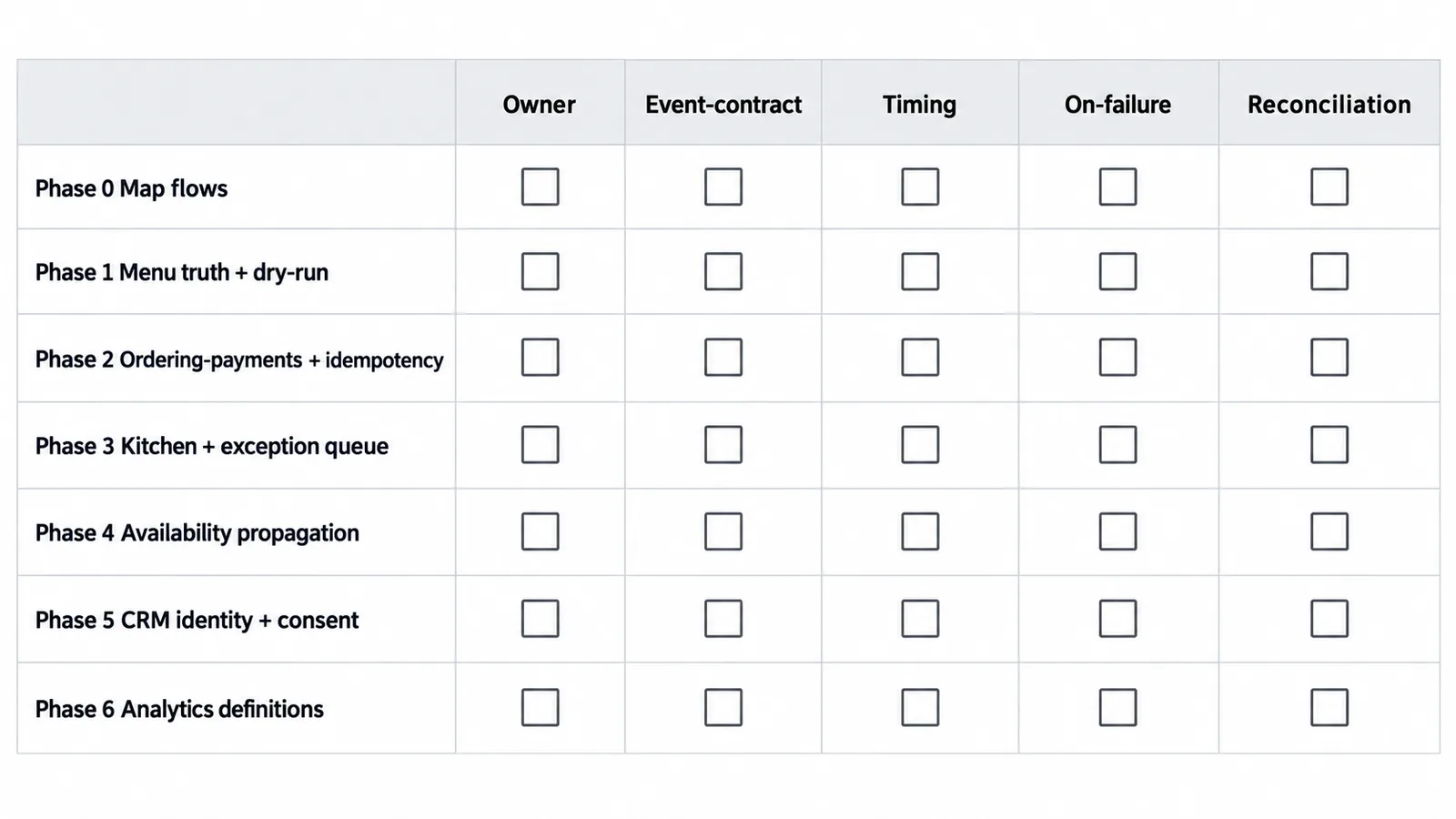
Do not advance a phase until its gate — source of truth, failure condition, owner, rollback — is demonstrated during service conditions.
Integration readiness checklist
Use this checklist before promoting each phase to production:
- [ ] System ownership is documented for every important field.
- [ ] Identifiers are stable and mapped across systems.
- [ ] Payloads are versioned or backward-compatible.
- [ ] Retries are safe and idempotent.
- [ ] Duplicate events and callbacks are handled.
- [ ] Failures are visible to an assigned operator.
- [ ] Reconciliation can identify missing or conflicting records.
- [ ] Manual fallback procedures are documented and trained.
- [ ] Access, secrets, and sensitive data are controlled.
- [ ] Logs include correlation IDs without exposing unnecessary data.
- [ ] Peak-load and partial-outage scenarios have been tested.
- [ ] Rollback or pause procedures are defined.
- [ ] Success criteria are measurable and reviewed after launch.
How to prioritize the roadmap
Rank integration phases by business risk, operational frequency, dependency depth, and reversibility. A payment or kitchen failure usually deserves more attention than a low-frequency marketing synchronization because its impact is immediate and difficult to recover manually.
A simple prioritization workshop can score each workflow from one to five across four dimensions: customer impact, financial impact, operational risk, and implementation complexity. High-impact, lower-complexity improvements should usually come first, while high-impact, high-complexity work should be decomposed into smaller releases.
Release in controlled increments. Start with one location, one menu, or one channel when possible. Monitor real orders, exceptions, reconciliation results, and staff feedback. Expand only when the workflow is stable and the support process is clear.
Final takeaway
A restaurant technology integration roadmap is a sequence of operational guarantees. Menu truth enables consistent ordering. Reliable order and payment states protect revenue. Observable kitchen delivery protects service. Availability synchronization prevents avoidable cancellations. Unified customer data supports useful relationships. Shared analytics definitions turn activity into decisions.
If you are planning a restaurant platform integration or need to reduce risk in an existing stack, contact CodeAustral to discuss the workflows, dependencies, and rollout sequence that fit your operation.